Master How to Write AI Art Prompts for Stunning Results
Picture this: you type a few words into an AI art tool, hit enter, and… garbage. A blurry, uninspired mess stares back at you. Sound familiar? If you’ve ever felt the sting of disappointment after generating AI art, you’re not alone. But here’s the kicker—your words hold the power to create breathtaking visuals. Learning how to write AI art prompts can turn your wildest ideas into stunning digital masterpieces. Let’s dive in.
Why Your AI Art Prompts Aren’t Working (Yet)
You’ve probably spent hours tweaking settings or staring at a screen, wondering why your AI art looks like a toddler’s scribble. I get it. That frustration of pouring your creativity into a prompt only to get a lifeless result? It stings. Maybe you’ve typed vague phrases like “cool dragon” or “pretty landscape” and hoped for the best. Spoiler: hope isn’t a strategy. The problem isn’t you—it’s how you’re communicating with the AI. But don’t worry, I’ve been there, and I’m here to help you crack the code.
The Magic Behind Crafting Perfect AI Art Prompts
Let’s get to the heart of it. Writing AI art prompts is like giving a recipe to a chef. Vague instructions equal a bland dish. Specific, vivid details? That’s how you get a five-star meal. Over the past year, I’ve experimented with hundreds of prompts, failing spectacularly at first, then stumbling onto game-changing insights. Here’s what I learned through trial, error, and transformation. Stick with me, because these lessons will save you time and frustration.
Insight 1: The Problem of Vague Language
Early on, I’d type something like “draw a castle” and get a generic, cartoonish blob. Problem? My prompt was too broad. AI doesn’t read minds—it needs clarity. I felt stuck, wondering if I’d ever get decent results.
Then came the discovery: specificity is everything. I started adding details like “medieval stone castle on a misty cliff at sunset, hyper-realistic, cinematic lighting.” Boom. The AI delivered a jaw-dropping image that looked straight out of a fantasy movie.
The transformation was instant. By painting a clear picture with my words, I gave the AI a roadmap. You can do this too. Stop being vague. Get granular. Your results will thank you.
Specificity turns a bland AI art prompt into a vivid masterpiece. Describe every detail like you’re directing a movie scene.
Insight 2: The Struggle of Missing Style Cues
Here’s another trap I fell into: ignoring art style. I’d write “futuristic city” and end up with a weird mix of cartoon and realism. Problem? I didn’t tell the AI what aesthetic I wanted. Honestly, this surprised me—why didn’t the AI just know?
My discovery came from studying successful prompts online. Adding style descriptors like “cyberpunk, neon lights, Blade Runner-inspired” changed everything. Suddenly, my cityscapes had that gritty, dystopian vibe I craved.
The transformation was empowering. Once you define the style, the AI nails the mood. Try it. Want a dreamy vibe? Add “impressionist painting.” Craving drama? Toss in “cinematic, dark and moody.” You’ve got the reins.
Insight 3: The Oversight of Emotional Impact
One of my biggest flops was ignoring emotion. I’d prompt “woman in a forest” and get a lifeless, robotic figure. Problem? There was no feeling, no story. It felt flat, and I couldn’t figure out why.
Then I discovered the power of emotional cues. Adding phrases like “mysterious woman in a forest, gazing longingly at the horizon, melancholic atmosphere” brought the image to life. The AI captured a haunting, soulful expression that gave me chills.
Transformation hit hard. Emotion in your prompt creates connection. You want your art to evoke something—joy, sadness, wonder. So, bake that feeling into your words. Trust me, it’s a game-changer.
Insight 4: The Mistake of Ignoring Technical Details
Here’s where I really messed up: technical settings. I’d write decent prompts but forget to specify resolution or aspect ratio. Problem? My images came out distorted or low-quality, useless for my projects.
The discovery was simple but crucial—add technical modifiers. Including “4K resolution, 16:9 ratio, ultra-detailed” ensured my art was sharp and usable. Some tools even let you tweak lighting or camera angles in the prompt. Who knew?
Transformation time. Once I started adding these details, my art went from amateur to professional overnight. You can do the same. Don’t skip the tech specs—they’re your secret weapon for polished results.
Insight 5: The Pitfall of Not Iterating
Last lesson from my journey: I used to give up after one bad result. Problem? I didn’t tweak or experiment. I’d sulk instead of iterating, missing out on potential breakthroughs.
My discovery came after frustration forced me to try again. Changing one word—like swapping “bright” for “ethereal”—or adjusting the order of descriptors often fixed everything. Iteration became my best friend.
The transformation was a mindset shift. Don’t stop at the first draft of your prompt. Play with it. Refine it. You’ll uncover hidden gems in your AI’s output. Keep going.
5 Actionable Steps to Write AI Art Prompts Like a Pro
Now that you’ve seen the pitfalls and discoveries, let’s put this into practice. Here are five actionable steps to craft AI art prompts that deliver stunning results every time. Follow these, and watch your creativity soar.
- Start with the Core Subject – Define your main focus. Is it a “warrior,” a “spaceship,” or a “sunset beach”? Be clear about the centerpiece of your image. Don’t leave the AI guessing. A strong foundation sets the tone.
- Add Descriptive Details – Layer in specifics. Think about location, time of day, colors, and textures. “A fierce warrior in a snowy mountain pass at dawn, wearing tattered red armor” paints a vivid picture. The more, the better.
- Specify the Art Style – Choose your vibe. Want realism? Say “photorealistic.” Dreaming of a painting? Try “oil painting, Van Gogh style.” This guides the AI to match your vision. Experiment with styles to find your favorite.
- Inject Emotion or Mood – Make it feel alive. Add emotional cues like “sorrowful,” “triumphant,” or “mysterious.” A “spaceship escaping a crumbling planet, desperate and chaotic” hits harder than just “spaceship.” Emotion draws viewers in.
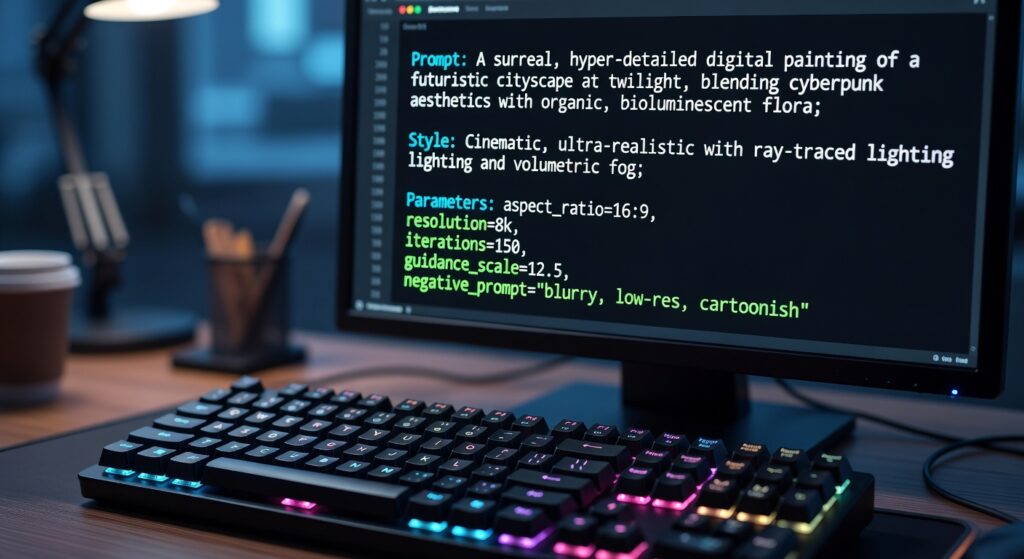
- Include Technical Specs – Finish with polish. Add “8K resolution, cinematic lighting, 16:9 ratio” to ensure quality. These little extras elevate your output from meh to masterpiece. Don’t skip this step if you want pro-level art.
Common Mistakes to Avoid When Writing Prompts
Before we wrap up, let’s cover a few traps to dodge. First, don’t overcomplicate your prompt with conflicting ideas—like “realistic cartoon.” Pick one direction. Second, avoid being too wordy. AI can get confused if your prompt reads like a novel. Keep it concise but detailed. Third, don’t ignore the tool’s guidelines. Some platforms have specific syntax or limits—read up. You’ll save yourself headaches by steering clear of these missteps. Honestly, I’ve fallen into all of them at some point. Learn from my mistakes.
Unlock Your AI Art Potential with ComfyArts.com
Ready to create AI art that stops people in their tracks? You’ve got the blueprint for how to write AI art prompts that deliver jaw-dropping results. But here’s the best part—ComfyArts.com makes it even easier. Our platform is designed to help you craft prompts and generate stunning visuals with just a few clicks. Whether you’re a beginner or a seasoned artist, we’ve got the tools to bring your imagination to life. Sign up today, experiment with these tips, and watch your creativity explode. What are you waiting for? Let’s create something extraordinary together.